Context Manager: debugging context in an agentic IDE
A proposal to inspect, select, edit, and branch session context. Better human decisions for a better agentic development cycle.
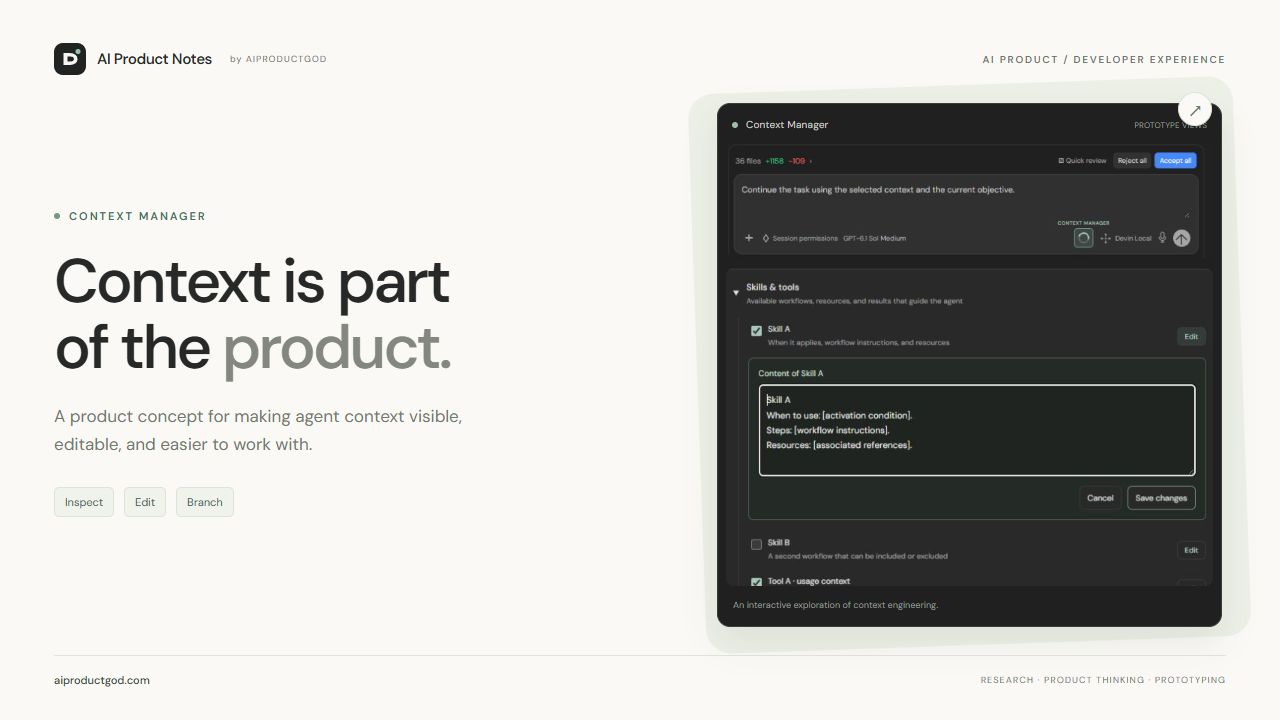 Explore the interactive Context Manager ↓
In this note
- From a usage indicator to a control surface
- Interactive prototype
- A context tree for the next action
- Context Branches: comparing a decision, not just two chats
- An example: an earlier decision no longer applies
- How it fits Devin, Codex, and Antigravity
- How to evaluate whether it helps
- A first scope: make what we can control visible
- Step-by-step visual guide
In an agentic development environment, writing the next prompt is only part of the work. The agent also operates with project instructions, skills, tools, previous results, and decisions accumulated throughout the session. Together, they shape what it does next.
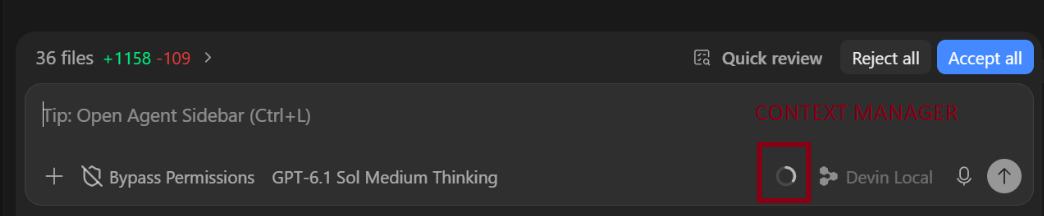
My proposal is to give that context its own interface: a Context Manager opened from the circular context indicator in the composer. A place to inspect session state, select the blocks that will participate in the next action, and create branches to explore alternatives.
The goal is to improve context engineering: designing and reviewing the information and capabilities we make available to the agent for a specific task. I want us to debug that context as deliberately as we review a diff.
From a usage indicator to a control surface
The following screenshot shows the proposed entry point in Devin Desktop, formerly Windsurf. The circle highlighted in red would open Context Manager; the dropdown described below is a concept design.
Context you can inspect.
Click the circle to select and edit blocks, review the full conversation, and work with branches. The examples represent any workflow; this prototype runs only on this page and does not execute agents.
Context Manager
Context included in the next action · 12/12 blocks
System promptInstructions and priorities
Skills & toolsAvailable workflows, resources, and results that guide the agent
Session memoryFull history: user messages, visible replies, and decisions
Full conversation · 4 messages
The full visible history of this example session, including excluded messages. Edits create a context variant in this branch; the original history remains available for reference.
Review each turn while preserving its order and author.
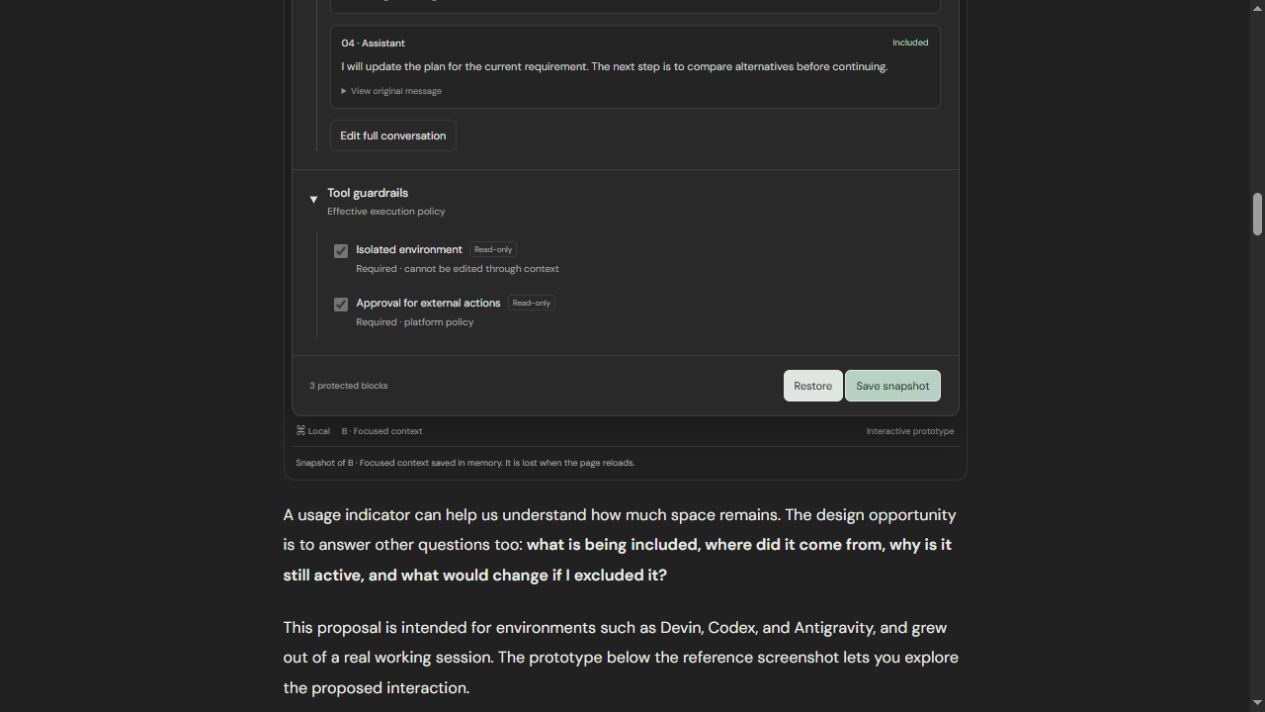
Tool guardrailsEffective execution policy
Dependency to review: you are keeping a tool result without its associated usage context.
Example selection · changes stay on this page.
A usage indicator can help us understand how much space remains. The design opportunity is to answer other questions too: what is being included, where did it come from, why is it still active, and what would change if I excluded it?
This proposal is intended for environments such as Devin, Codex, and Antigravity, and grew out of a real working session. The prototype below the reference screenshot lets you explore the proposed interaction.
A context tree for the next action
Clicking the circle would open a dropdown panel with expandable groups and checkboxes. Each block would show its origin, scope, and status: available, included, summarized, excluded, or protected. The selection would apply to a specific action and a version of the context. Each editable block would have an Edit action to review its content, save it, or cancel changes without altering the checklist.
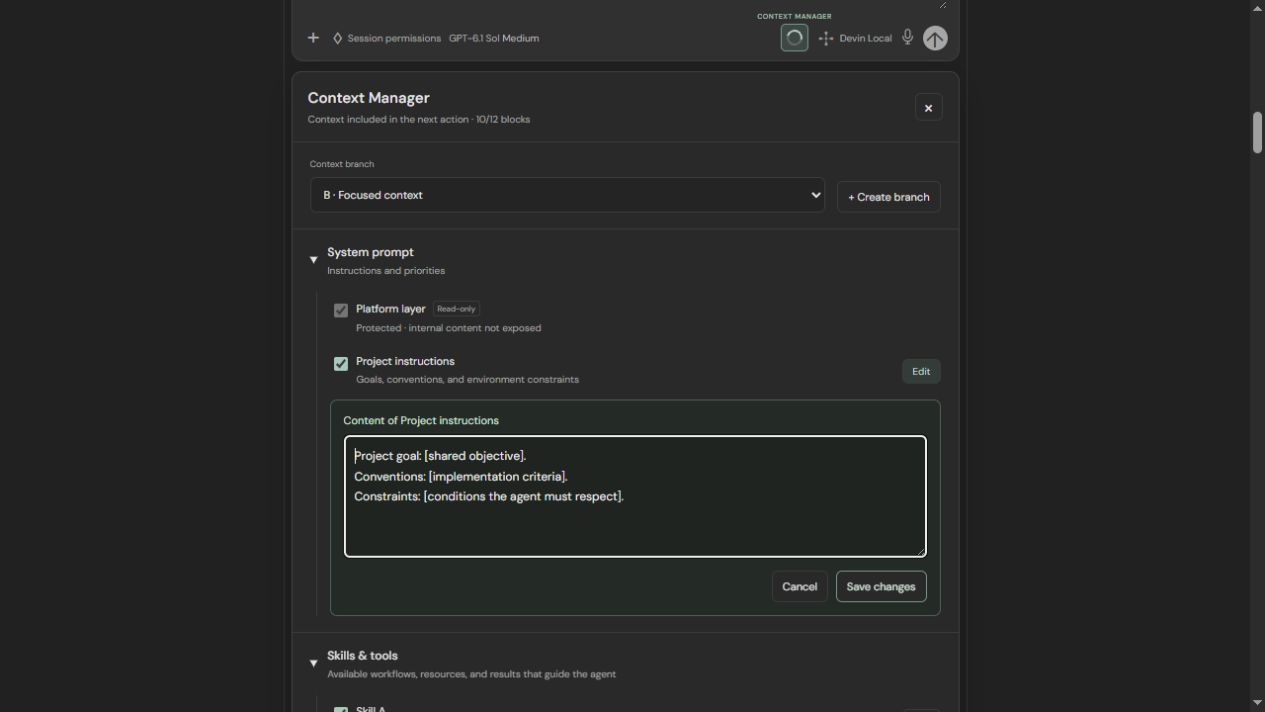
1. System prompt and instructions. A view of the instructions the product makes available for inspection, including project instructions and their priorities. Unexposed platform instructions would appear as a protected layer; the inspector should not promise access to internal content the provider does not publish. Mandatory rules would be read-only.
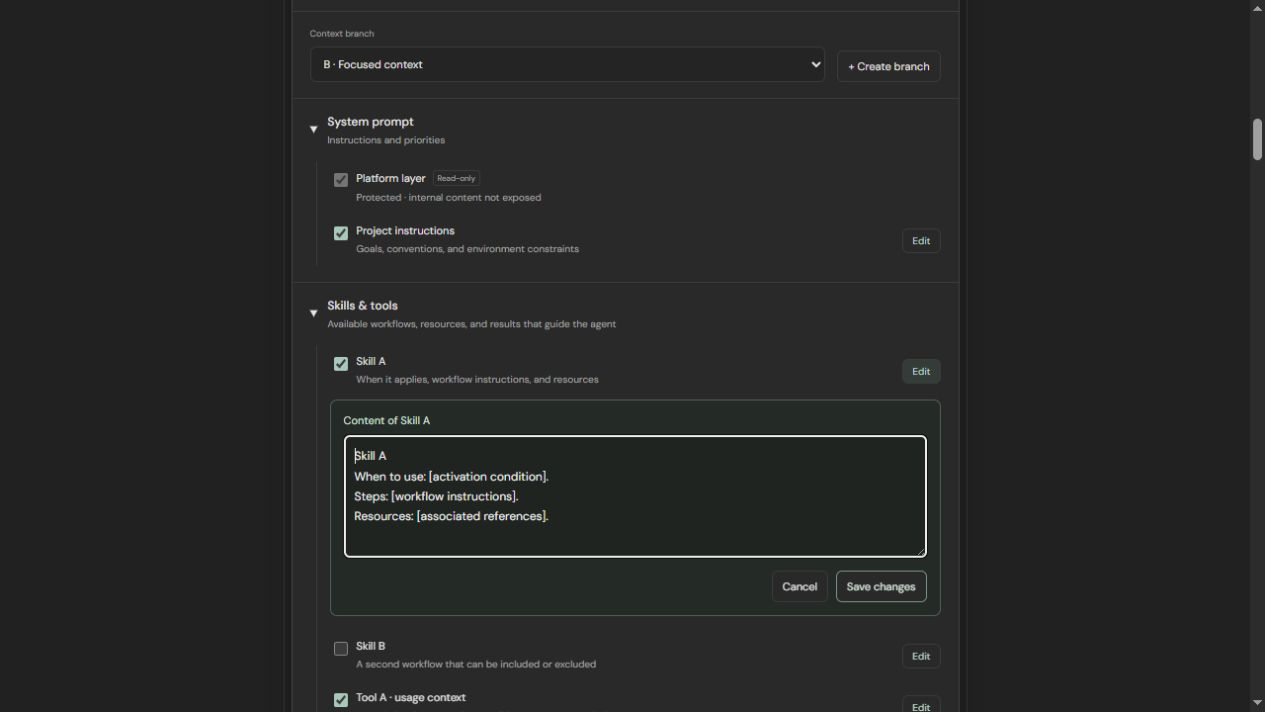
2. Skills, tools, and associated context. A list of available skills and capabilities, with their origins and linked resources. Each skill would explain when it is used, what instructions it provides, and what resources it needs; each tool would show its purpose, inputs, and associated context. The demo uses Skill A and Skill B to represent any workflow. Three things should remain distinct: whether a tool is available, whether its instructions have been loaded, and whether its previous outputs are part of the context. Edits would apply to the branch’s context variant, without automatically changing the original skill files or service permissions.
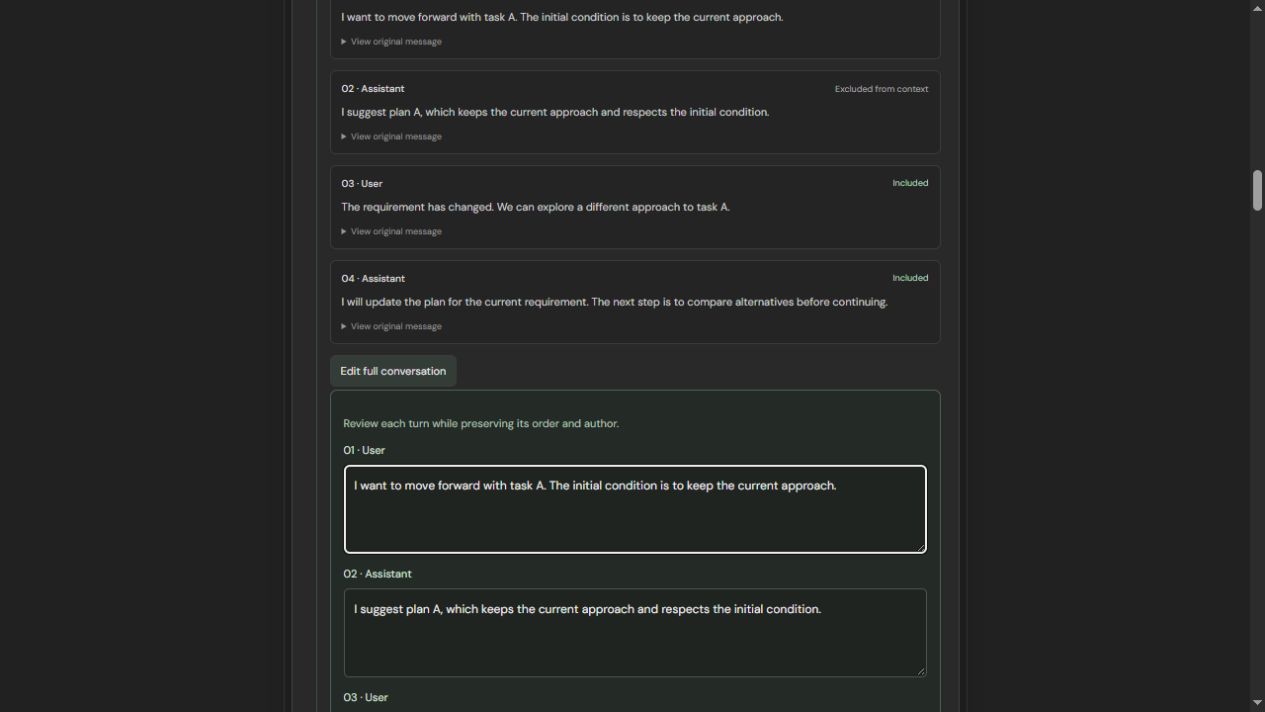
3. Session memory and the full conversation. An ordered history of user prompts and visible assistant replies, with their authors, origins, and inclusion status. You could edit an individual message or open Edit full conversation to review every turn together. Excluded messages would remain visible in the history, clearly marked: excluding a message from the next action does not delete it. Edits would create an alternative version within the branch while preserving the original messages for reference. Summaries, referenced files, and retained outputs would also need to be represented; if compaction has occurred, the inspector would distinguish the visible history from the summary actually being sent. This view concerns visible messages, not private internal reasoning.
4. Tool guardrails. A view of effective execution limits: permissions, scopes, and approval points. It is essential to separate task preferences from system-enforced restrictions. Unchecking a context block should never grant permissions or disable a mandatory protection.
For the tree to be useful, dependencies must be visible too. Excluding a tool result while keeping a reply that relies on it can leave a conclusion without supporting evidence. The product should flag this and let the user review the related blocks before continuing.
Context Branches: comparing a decision, not just two chats
The next step is to group these selections into Context Branches: explicit variants of a session state, created from the same starting point.
Branch A would retain the reference context. Branch B could exclude a discarded hypothesis, replace an outdated summary, or load a more specific skill. Both would receive the same prompt so we could observe how the output changes when the context changes.
We could also keep the context fixed and vary the prompt. Changing both at once is still useful for exploration, but no longer lets us attribute the difference to a single factor. The interface should make that clear.
Each snapshot would need to record the prompt, selected blocks and their edited versions, the conversation used, the model and available configuration, accessible resources, and execution policy. Where information is retrieved dynamically, each run would also need to record what was retrieved. A visual tree alone does not guarantee reproducibility.
An example: an earlier decision no longer applies
Imagine a refactoring session. Early on, migrating an API was ruled out; later, the requirement changed. The agent keeps proposing a solution based on the earlier decision.
With Context Manager, a person could find the old exchange, check whether it is present verbatim or within a summary, and create a branch that replaces it with the new decision. Starting from the same repository commit, they would repeat the task with the same prompt and an equivalent configuration.
The review would compare the diff, tests, and consistency with the current requirement. If branch B performs better, that would be evidence for this scenario; more tasks and repeated runs would be needed to conclude that the general strategy improves agentic development.
That is the role of the human in the loop: intervene in an identifiable decision, understand its effect, and review the evidence before accepting the result.
How it fits Devin, Codex, and Antigravity
Parts of this idea already exist across the ecosystem, although their interfaces and scope differ:
- Devin Desktop, formerly Windsurf. Cognition describes an environment for managing local and cloud agents and sharing context through Spaces. This article proposes an additional block-level view and snapshots for a session action. Official introduction to Devin Desktop.
- OpenAI Codex. Prompts,
AGENTS.mdinstructions, and skills influence how the agent works. OpenAI recommends revisiting accumulated instructions and avoiding unnecessary context. Context Manager would make that composition more visible at the point of action. OpenAI guidance on skills and prompts. - Google Antigravity. Its documentation distinguishes persistent rules from skills and describes rules with different scopes and activation modes. A view of provenance and priority would help users inspect which rules apply to a specific action. Official rules documentation.
These references provide context for the proposal. They do not imply that all three products implement the same system or lack other context-management tools.
How to evaluate whether it helps
The hypothesis is that inspecting and branching context reduces the effort required to diagnose context-related errors and enables more precise human interventions. There are no measured results for this prototype yet.
An evaluation would compare equivalent tasks using the usual workflow and the inspector. It would keep the repository starting point, model, and tools consistent, record variations that cannot be fixed, and repeat runs to account for agent variability.
I would measure time to locate and correct the cause, task success based on tests and human review, regressions, cost, and latency. I would also observe errors introduced by excluding useful information and whether the person understands what they selected. Fewer tokens or a shorter response do not automatically mean a better result.
Branches should run in isolated environments so that one cannot alter the repository or services used by the other. Results would appear alongside the snapshot that produced them, with evidence and limitations, without making the model’s own assessment the sole measure of quality.
A first scope: make what we can control visible
A first version could start with selectable project blocks and messages, a protected instructions-and-permissions layer, read-only snapshots, and a comparison between two branches. Retrieval traces, token estimates, and evaluation runs could come later.
The product challenge is to provide this precision without turning every interaction into a form. The circle would remain discreet; complexity would appear when we need to investigate, correct, or experiment.
Building better agentic products also requires better tools for understanding how we guide them. Context Manager would bring that work closer to the place where we already decide what to ask the agent.
Context Manager, step by step
These prototype screenshots explain each part. Return to the interactive demo to try them out.
01Open the inspector and choose a branch
The circle beside the agent opens the context for the next action. The selector identifies the active branch; Create branch copies its selection, content, and prompt so you can explore an independent variant.
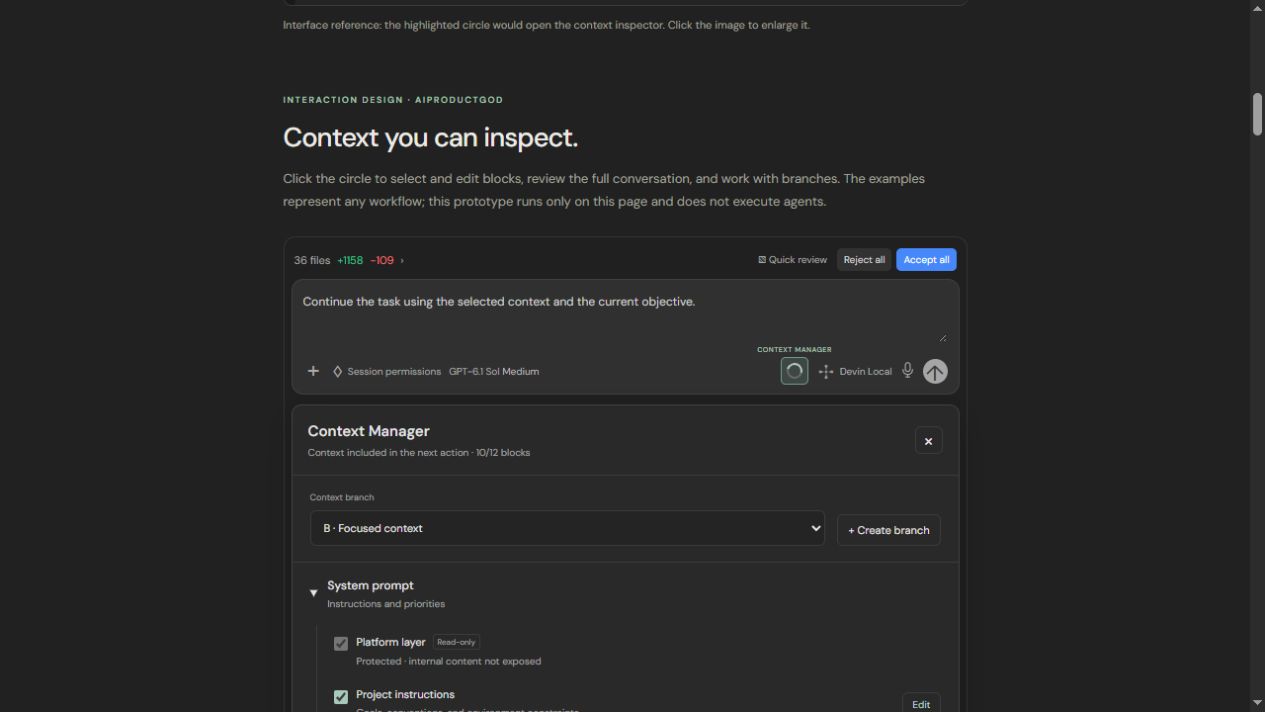
02Inspect the instructions
System prompt brings together instruction layers and their priorities. Project instructions can be selected and edited: goals, conventions, and environment constraints.
03Select and edit skills and tools
The checklist determines which blocks participate. Edit lets you review a skill: when to use it, its steps, and its resources. Skill A and Skill B represent generic workflows.
04Review the full conversation
Session memory displays messages in order, with their author and inclusion status. An excluded message remains visible so you can understand how the conversation evolved.
05Check limits and save the state
Tool guardrails makes execution restrictions visible. Required blocks remain protected while the rest of the context stays selectable and editable.